
A commission for menewsha.com. Menewsha Bishie Alliance (M.B.A) are official Non Playable Characters (NPC) in menewsha.com. Cain/Abel, Nalin, Nami, Magnus, Lance, Mr. Mayor, Jeryk and Toymaker.
给menewsha.com的委托绘画作品。Menewsha美男子联盟是menewsha.com官方人物。凯因或亚貝尔、纳林、纳米、麦葛那斯、岚斯、市长先生、杰力克、玩具家。
Had not been very productive in the last few years after making the blog, been busy with university and what not. Which a few projects are abandoned due to not enough time or motivation at that time. Even though when I am productive, have completely forgotten about the blog. XD
自从制造了网志,为了大学类似的事情变得非常忙碌导致近几年来没有作出任何作品。同时也因为时间与动力不足而放弃了一些计划。就算偶尔完成了作品也把网志给忘掉了。XD
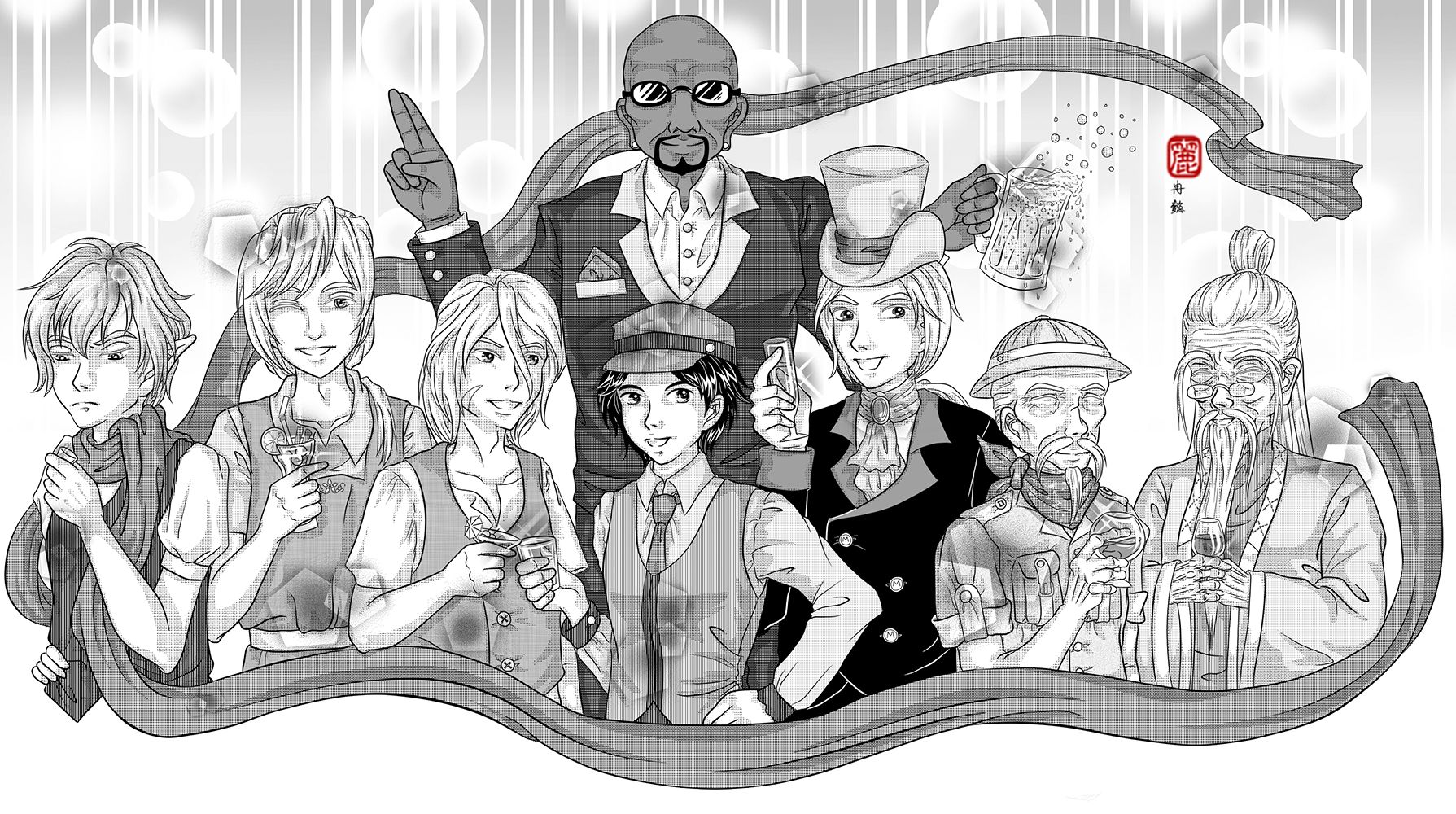
It had been a long while since I update this blog, so I decided to start off with a smashing group art. Unfortunately, this time I don't have the progression pictures as I work in different medias for this group art. I will still try to cover all phase shortest as possible.
离上次更新已经很久了,所以决定用闪耀的团体图来开场。可惜的是,因为这次绘画传统电脑并用所以没有收录过程截图。我还是会尽量以最短的文字来解释每个阶段。
1. Preliminary Phase - Planning
Actually the same steps taken for planning in the post July 27th, 2010 - Heirs to the Legend - Preliminary Planning, 2010. Refer to that post, unfortunately, one of the project that I abandoned.
1. 预备阶段 - 计划
其实利用了曾经写过的27日7月2010年 - 传说的继承人 - 预备计划类似的方法。参考那篇,不幸的,是被放弃的绘画之一。
2. Executing Phase - Sketch
It started off simple circles, and decide their poses that match their personalities. This time I do it with paper and pencil.
2. 执行阶段 - 草图
用简单的圆形开始,决定每人的姿势务必配合人物的性格。这次我是用铅笔画在纸上。
用简单的圆形开始,决定每人的姿势务必配合人物的性格。这次我是用铅笔画在纸上。
3. Executing Phase - Line
I originally ink it by pen, but when I scanned in, I felt that the lines are really bad. As a perfectionist, I retrace all the line digitally in SAI. Whilst fix a few mistakes on the way.
3. 执行阶段 - 构线
我原本打算只是用构图笔的,可是扫描进去之后,觉得线很难看。身为完美主义者,我重新在电脑用SAI描线。同时也趁机修改了一些错误。
3. 执行阶段 - 构线
我原本打算只是用构图笔的,可是扫描进去之后,觉得线很难看。身为完美主义者,我重新在电脑用SAI描线。同时也趁机修改了一些错误。
4. Executing Phase - Tone
Took me some time to find the appropriate tones for each section. I use Manga Studio to fill in the tones. They have a library of special tones that I find useful. Then I export it over to Photoshop to shade. Not much tips other than balancing the screentone type and beware of the clash of too MANY patterns.
4. 执行阶段 - 网点
我用了很久的时间来为每个部分寻找适合的网点。我用Manga Studio来贴网点。它拥有一拖拉库我认为很实用的特别网点。之后传进Photoshop来上光影。并没有什么特别的捷径除了平衡网点类别和注意别利用太多不同的花纹。
我用了很久的时间来为每个部分寻找适合的网点。我用Manga Studio来贴网点。它拥有一拖拉库我认为很实用的特别网点。之后传进Photoshop来上光影。并没有什么特别的捷径除了平衡网点类别和注意别利用太多不同的花纹。
---
Character 人物: MBA 美男盟
Medium 媒介: Pencil铅笔, Sakura Micron Pen 樱色代针笔0.1,0.3,0.5, Digital 电脑
Tool工具 : HP Pavillion, 64-bit Vista, 4gb DDR3, nVidia Geforce GT120, WACOM Intuous 3.
Programme 软件: SAI彩, Manga Studio EX4, Adobe Photoshop CS6
Tool工具 : HP Pavillion, 64-bit Vista, 4gb DDR3, nVidia Geforce GT120, WACOM Intuous 3.
Programme 软件: SAI彩, Manga Studio EX4, Adobe Photoshop CS6

No comments:
Post a Comment