A gift for Lady Delaidra from gaiaonline.com.
致gaiaonline.com娣莱德拉小姐的礼物。
Few days in between September and October, depending on mood, I used around ten days time to complete this art. After drawing so many monochrome screentone manga style, now I would like to try out traditional and semi realism. At the beginning of the year, I met this old friend from a certain website, the character she wanted drawn very suitable for semi realism, so I used her as an experiment.
九月到十月期间的几天,端看心情,用了大约十天的时间完成这幅画。画了那么多黑白网点漫画风格,现在想转换进攻传统和仿真。年头的时候遇上了某个网站的旧友,而她所想要画的人物非常适合仿真,所以就打算拿她当试验品了。
The character is drawn in SAI, background and bronze circle is made in Photoshop CS 6. The inspirational motivation came from KAGAYA's Zodiac series desktop background, attempting to achieve the atmosphere between semi realism and fantasy. I learn a few tricks from this creation, most of them being feather adjustment. The bubbles disappointed me somehow, no matter how I adjust, it just never seem fantasy and semi real enough.
人物是用彩画的,背景和铜圈是在Photoshop CS 6弄的。大约的动力灵感来自于KAGAYA的十二星座系列的壁纸,想弄出那种介于仿真和梦幻的感觉。此次创作学了一些新手法,多数是羽化的控制。比较令我失望的是泡沫,无论如何怎么调整都不怎么梦幻、不怎么仿真。
---
Character 人物: Lady Delaidra 娣莱德拉小姐
Medium 媒介: Digital 电脑
Tool工具 : HP Pavillion, 64-bit Vista, 4gb DDR3, nVidia Geforce GT120, WACOM Intuous 3.
Programme 软件: SAI彩, Photoshop CS6
i·DeA
This is my Work In Progress Showcase.
这是我的绘画过程纪录。
这是我的绘画过程纪录。
Wednesday, December 4, 2013
Monday, September 16, 2013
Wheistadeur - Map
This is a map created for one of my stories.
这地图是我为我写的其中之一的故事而作的。
I added in the country names and splash a bit of colour for the green forest and yellow desert.
我放上了国家的名字和洒上一些颜色,绿树林和黄沙漠。
Finish!
完成!
---
Object 物体 : Map 地图
Medium 媒介: Digital 电脑
Tool工具 : HP Pavillion, 64-bit Vista, 4gb DDR3, nVidia Geforce GT120, Wacom Intuos 3
Programme 软件: Adobe Photoshop CS6
这地图是我为我写的其中之一的故事而作的。
I added in the country names and splash a bit of colour for the green forest and yellow desert.
我放上了国家的名字和洒上一些颜色,绿树林和黄沙漠。
Finish!
完成!
---
Object 物体 : Map 地图
Medium 媒介: Digital 电脑
Tool工具 : HP Pavillion, 64-bit Vista, 4gb DDR3, nVidia Geforce GT120, Wacom Intuos 3
Programme 软件: Adobe Photoshop CS6
Labels:
§ ~ Art,
† ~ Digital,
∞ ~ Showcase,
4 ~ Color
Saturday, September 14, 2013
Wheistadeur - III Dendrology
This is a map created for one of my stories.
这地图是我为我写的其中之一的故事而作的。

1. Basically, growth of forest requires soil, light and water. There are of course plants that do not require soil or light or water, but they normally won't be enough to form a large forest area.
The map's angle is not directly above, but a bit aerial view. The tree trunk would be revealed under the canopy, therefore it can approximately divided into canopy and trunk portions, and made two different brush presets for them.
Canopy - Due to the shape of forest is different shape and sizes, therefore the brush preset could not be define as the whole canopy shape. Instead, a crescent shape brush could be used to quickly shape out the forest outline and still versatile enough to keep the canopy edges.
Trunk - Simply draw out the basic trunk shape, then define as brush preset.
First, draw out the outline of the forest, then stamp the trunk underneath the canopy.
1. 大致上,森林的形成需要土、光和水。当然有些植物不需要土或光或水,不过那些通常不能形成巨大的森林区域。
地图的角度并不是直角,而是些微斜角。树干只会在树叶下露出,所以可以划分为树叶和树干,为此作了两种笔刷。
树叶 - 因为森林的形状大小不一,而且形状也不规则,所以笔刷不能是一个森林。反而是一个弦月形状更能很快的画出森林的区域,也保持树叶的约略形状。
树干 - 画出基本的树干,再弄成笔刷。
首先画出森林的区域,然后在下面印上树干。
2. Adding in forest, mountain, waves, swamps and all other details, yet it still looks kinda flat, so I added in some shadows, used only a small brush to crosshatch.
Then, the last part would be polishing up the map. Details of the map would still require a compass, scale bar and of course, the name. I merge the design of the name and compass together, and added a scale down global map as background of the compass. Other than standard unit for distance in the scale bar, I also added a scale for travelling time.
The last final part, polishing the map edges. I used masking to draw out the jagged edges of the map, by deciding how the map was rolled, then randomly added in the folds. The longer the fold, the longer the shadows. For a more realistic effect, I used Feather effect to add a paper texture overlay, and Inner Glow for darker outline.
2. 加上了森林、山峦、海浪、沼泽和一切细节,因为看起来还是很平坦,所以画上了阴影。只是用细小的笔刷画出交叉纹。
之后就是最后的地图修饰阶段。地图所需的细节还有指南针、还有距离尺寸,当然少不了名字。我把指南针和名字一起融合仅设计里,背景也画上星球图缩小地图。距离尺寸除了距离的单位也放上了需要的行走时间。
最最后,地图的边缘修饰。我是用masking来画出地图的缺角,先决定地图是怎么被卷的,之后随机的把折痕画出来。越长的折痕,阴影也越长。为了更逼真的效果,用羽化覆上一层纸质的花纹,还有内光刻画出更深色的边缘。
---
Object 物体 : Map 地图
Medium 媒介: Digital 电脑
Tool工具 : HP Pavillion, 64-bit Vista, 4gb DDR3, nVidia Geforce GT120, Wacom Intuos 3
Programme 软件: Adobe Photoshop CS6
Forest 森林
1. Edit > Define Brush Preset
2. [Canopy]
Brush setting > Brush Tip Shape > Spacing
Brush setting > Shape Dynamic > Size Jitter + Angle Jitter
Map地图
Feather > Stroke
Feather > Inner Glow
Feather > Pattern Overlay
这地图是我为我写的其中之一的故事而作的。

The map's angle is not directly above, but a bit aerial view. The tree trunk would be revealed under the canopy, therefore it can approximately divided into canopy and trunk portions, and made two different brush presets for them.
Canopy - Due to the shape of forest is different shape and sizes, therefore the brush preset could not be define as the whole canopy shape. Instead, a crescent shape brush could be used to quickly shape out the forest outline and still versatile enough to keep the canopy edges.
Trunk - Simply draw out the basic trunk shape, then define as brush preset.
First, draw out the outline of the forest, then stamp the trunk underneath the canopy.
1. 大致上,森林的形成需要土、光和水。当然有些植物不需要土或光或水,不过那些通常不能形成巨大的森林区域。
地图的角度并不是直角,而是些微斜角。树干只会在树叶下露出,所以可以划分为树叶和树干,为此作了两种笔刷。
树叶 - 因为森林的形状大小不一,而且形状也不规则,所以笔刷不能是一个森林。反而是一个弦月形状更能很快的画出森林的区域,也保持树叶的约略形状。
树干 - 画出基本的树干,再弄成笔刷。
首先画出森林的区域,然后在下面印上树干。
Then, the last part would be polishing up the map. Details of the map would still require a compass, scale bar and of course, the name. I merge the design of the name and compass together, and added a scale down global map as background of the compass. Other than standard unit for distance in the scale bar, I also added a scale for travelling time.
The last final part, polishing the map edges. I used masking to draw out the jagged edges of the map, by deciding how the map was rolled, then randomly added in the folds. The longer the fold, the longer the shadows. For a more realistic effect, I used Feather effect to add a paper texture overlay, and Inner Glow for darker outline.
2. 加上了森林、山峦、海浪、沼泽和一切细节,因为看起来还是很平坦,所以画上了阴影。只是用细小的笔刷画出交叉纹。
之后就是最后的地图修饰阶段。地图所需的细节还有指南针、还有距离尺寸,当然少不了名字。我把指南针和名字一起融合仅设计里,背景也画上星球图缩小地图。距离尺寸除了距离的单位也放上了需要的行走时间。
最最后,地图的边缘修饰。我是用masking来画出地图的缺角,先决定地图是怎么被卷的,之后随机的把折痕画出来。越长的折痕,阴影也越长。为了更逼真的效果,用羽化覆上一层纸质的花纹,还有内光刻画出更深色的边缘。
---
Object 物体 : Map 地图
Medium 媒介: Digital 电脑
Tool工具 : HP Pavillion, 64-bit Vista, 4gb DDR3, nVidia Geforce GT120, Wacom Intuos 3
Programme 软件: Adobe Photoshop CS6
Forest 森林
1. Edit > Define Brush Preset
2. [Canopy]
Brush setting > Brush Tip Shape > Spacing
Brush setting > Shape Dynamic > Size Jitter + Angle Jitter
Map地图
Feather > Stroke
Feather > Inner Glow
Feather > Pattern Overlay
Labels:
† ~ Digital,
3 ~ Line,
4 ~ Color,
4 ~ Shade,
5 ~ Special Effect
Sunday, September 8, 2013
Wheistadeur - II Hydrology
This is a map created for one of my stories.
这地图是我为我写的其中之一的故事而作的。
1. There are few types of water source, flowing rivers or stagnant lake. Most water source came from mountain, flowing downwards due to gravity, these are mostly rivers, it could end up in lake, hole or ocean, there could be waterfall, river joint or separation on the way. If the mountains are close to each other, the shape of the river will follow the curve, river would have wider curve on flat land.
Following different sizes of river, I used different sizes of round brush to draw out the river's location. Similarly, I also used feather effect to stroke the outline of the river.
1. 陆上水源有几种,流动的河、静止的湖泊。水源多由高山出来,因地心吸力而往低地流淌,这类多数是河流,终点可以是湖泊、地洞或大海,途中可以有瀑布、连接别河或分歧。山峦如果密集,河流的形状会跟着弯曲,在平地河流曲度比较大。
根据河流的大小,我用不同大小的圆刷勾勒出河流的去向。相同的,也有用羽化效果构线。
2. There are different lake formations too, some were form due to river separation, some formed due to land height changes after earthquake, glaciers could form a lake too. The other stagnant water source is swamp, it has softer earth, water often shallow and trees, could be a combination between lake and forest.
I only draw out the shape for the lake, as for swamp I used short lines to indicate the shallow water, something like screen tone pattern.
2. 湖泊的形成也有不同,有些是因河流分歧之后独立的湖泊,有些是地震而集萃的湖泊,也有喷泉的地方也能形成湖泊。静止的水源还有沼泽,沼泽泥土比较软,水通常不深,也有树林,是树林和湖泊的融合体。
湖泊只是画出它的形状,至于沼泽就用笔刷画短线来表示不深的水源,类似用网点的效果。
---
Object 物体 : Map 地图
Medium 媒介: Digital 电脑
Tool工具 : HP Pavillion, 64-bit Vista, 4gb DDR3, nVidia Geforce GT120, Wacom Intuos 3
Programme 软件: Adobe Photoshop CS6
Water 水
Feather > Stroke
这地图是我为我写的其中之一的故事而作的。
Following different sizes of river, I used different sizes of round brush to draw out the river's location. Similarly, I also used feather effect to stroke the outline of the river.
1. 陆上水源有几种,流动的河、静止的湖泊。水源多由高山出来,因地心吸力而往低地流淌,这类多数是河流,终点可以是湖泊、地洞或大海,途中可以有瀑布、连接别河或分歧。山峦如果密集,河流的形状会跟着弯曲,在平地河流曲度比较大。
根据河流的大小,我用不同大小的圆刷勾勒出河流的去向。相同的,也有用羽化效果构线。
I only draw out the shape for the lake, as for swamp I used short lines to indicate the shallow water, something like screen tone pattern.
2. 湖泊的形成也有不同,有些是因河流分歧之后独立的湖泊,有些是地震而集萃的湖泊,也有喷泉的地方也能形成湖泊。静止的水源还有沼泽,沼泽泥土比较软,水通常不深,也有树林,是树林和湖泊的融合体。
湖泊只是画出它的形状,至于沼泽就用笔刷画短线来表示不深的水源,类似用网点的效果。
---
Object 物体 : Map 地图
Medium 媒介: Digital 电脑
Tool工具 : HP Pavillion, 64-bit Vista, 4gb DDR3, nVidia Geforce GT120, Wacom Intuos 3
Programme 软件: Adobe Photoshop CS6
Water 水
Feather > Stroke
Labels:
† ~ Digital,
3 ~ Line,
5 ~ Special Effect
Wednesday, September 4, 2013
Wheistadeur - I Geography
This is a map created for one of my stories.
这地图是我为我写的其中之一的故事而作的。
1. The style I want to express is handmade fantasy old map style, the closer to the real thing the better. When drawing the land, first thing to note is:
It is rare to see nice smooth line in the Nature.
I also use Feather effect to outer glow the water colour.
1.我想表现的风格是魔幻手作复古地图风格,越接近真的越好。画陆地時,首先注意的是:
大自然很难得有滑顺的线条。
我还用羽化特效来标出水的颜色。
2. Then dealing with the different land height. The formation of the land, the mountain range often start from the center.
In the above screenshot, black represent low land and white represent high point.
2. 之后轮到陆地的不同高度了。陆地的形成,山脉多数是从中心开始的。
以上的图,黑代表低地,白代表高地。
3. Lazy me created three different mountain shape brush to easily replicate the mountains, one shape is mountain and another is hill. The difference would be the mountain's peak is sharper and steeper, hill is blunt and lower. The last type is volcano, the obvious difference is the crater.
By height, basically from the highest Mountain > Volcano > Hill as lowest. So when stamping the brush, I started from Mountain. Stamp Mountain on the white areas, and then according to the design of the world, put in the volcano, then lastly surround them with hills.
Note: Using different size of the brush would create gradual height change effect. From far, even though it is made with 3 identical shape, but it is able to create the effect of six different brushes, this will also make it look more handmade.
3. 懒惰的我为了山形准备了三种笔刷,一种是高峰,另一种是山丘。分别是高峰顶端比较尖也比较徒,山丘比较弯和低。最后一种是火山,最明显的差别是火山口。
高度来说,基本上是由最高的开始高峰》火山》山丘最低。所以印上笔刷的时候,我是从高峰开始。印在白色的区域,之后根据世界的设计,放上火山,最后才在周围印上山丘。
注意:活用不同的笔刷大小能显现出渐变的高度。远看起来,明明是三种笔刷也能作出好像有六種笔刷的感觉,那就比较接近手作的感觉。
---
Object 物体 : Map 地图
Medium 媒介: Digital 电脑
Tool工具 : HP Pavillion, 64-bit Vista, 4gb DDR3, nVidia Geforce GT120, Wacom Intuos 3
Programme 软件: Adobe Photoshop CS6
Water Level海岸线
Feather > Outer Glow
这地图是我为我写的其中之一的故事而作的。
It is rare to see nice smooth line in the Nature.
I also use Feather effect to outer glow the water colour.
1.我想表现的风格是魔幻手作复古地图风格,越接近真的越好。画陆地時,首先注意的是:
大自然很难得有滑顺的线条。
我还用羽化特效来标出水的颜色。
In the above screenshot, black represent low land and white represent high point.
2. 之后轮到陆地的不同高度了。陆地的形成,山脉多数是从中心开始的。
以上的图,黑代表低地,白代表高地。
By height, basically from the highest Mountain > Volcano > Hill as lowest. So when stamping the brush, I started from Mountain. Stamp Mountain on the white areas, and then according to the design of the world, put in the volcano, then lastly surround them with hills.
Note: Using different size of the brush would create gradual height change effect. From far, even though it is made with 3 identical shape, but it is able to create the effect of six different brushes, this will also make it look more handmade.
3. 懒惰的我为了山形准备了三种笔刷,一种是高峰,另一种是山丘。分别是高峰顶端比较尖也比较徒,山丘比较弯和低。最后一种是火山,最明显的差别是火山口。
高度来说,基本上是由最高的开始高峰》火山》山丘最低。所以印上笔刷的时候,我是从高峰开始。印在白色的区域,之后根据世界的设计,放上火山,最后才在周围印上山丘。
注意:活用不同的笔刷大小能显现出渐变的高度。远看起来,明明是三种笔刷也能作出好像有六種笔刷的感觉,那就比较接近手作的感觉。
---
Object 物体 : Map 地图
Medium 媒介: Digital 电脑
Tool工具 : HP Pavillion, 64-bit Vista, 4gb DDR3, nVidia Geforce GT120, Wacom Intuos 3
Programme 软件: Adobe Photoshop CS6
Water Level海岸线
Feather > Outer Glow
Labels:
† ~ Digital,
2 ~ Sketch,
3 ~ Line,
5 ~ Special Effect
Saturday, August 10, 2013
Paul the Phoenix - weavesilk.com
A experimental art for Hadsvich from menewsha.com. Paul the Phoenix belongs to Hadsvich. This art is produced using weavesilk.com.
为menewsha.com的Hadsvich而作的实验画。凤凰保罗属于Hadsvich。此画是用weavesilk.com而绘的。
---
Character 人物: Paul the Phoenix 凤凰保罗
Medium 媒介: Digital 电脑
Tool工具 : HP Pavillion, 64-bit Vista, 4gb DDR3, nVidia Geforce GT120, WACOM Intuous 3.
Programme 软件: weavesilk.com
为menewsha.com的Hadsvich而作的实验画。凤凰保罗属于Hadsvich。此画是用weavesilk.com而绘的。
---
Character 人物: Paul the Phoenix 凤凰保罗
Medium 媒介: Digital 电脑
Tool工具 : HP Pavillion, 64-bit Vista, 4gb DDR3, nVidia Geforce GT120, WACOM Intuous 3.
Programme 软件: weavesilk.com
Labels:
§ ~ Art,
† ~ Digital,
∞ ~ Showcase,
5 ~ Special Effect
Tuesday, July 23, 2013
Ei'lycia - Tone Video
A commission from menewsha.com. Ei'lycia belong to Arikana.
从menewsha.com委托的作品。夜丽希雅属于Arikana。
---
Character 人物: Ei'lycia夜丽希雅
Medium 媒介: Digital 电脑
Tool工具 : HP Pavillion, 64-bit Vista, 4gb DDR3, nVidia Geforce GT120
Programme 软件: CamStudio, Adobe Premiere CS6, Prism Video Converter
从menewsha.com委托的作品。夜丽希雅属于Arikana。
Character 人物: Ei'lycia夜丽希雅
Medium 媒介: Digital 电脑
Tool工具 : HP Pavillion, 64-bit Vista, 4gb DDR3, nVidia Geforce GT120
Programme 软件: CamStudio, Adobe Premiere CS6, Prism Video Converter
Labels:
† ~ Digital,
∞ ~ W.I.P Video,
4 ~ Tone
Sunday, July 14, 2013
Ei'lycia - Screen Tone
A commission from menewsha.com. Ei'lycia belong to Arikana.
从menewsha.com委托的作品。夜丽希雅属于Arikana。
This stage would be the last stage. Screen tone most commonly used by Japanese Comic, Manga. There are a lot of patterned screen tone available, from shading to backgrounds. If you are doing screen toning traditionally, it is a completely different skill to master, but if it is done digitally, it is the same tools you use. First, I got the black colour shaded in, just simple filling in the blanks.
这是最后阶段。通常会使用网点的是日本漫画。网点包罗万象,从简单的灰色到背景。如果用传统的方法贴网点的话,那会是完全不同的技术,可是如果用电脑的话,会用回相同的工具。首先将黑色涂上,简单的上色。
Before the whole screen toning started. I already have a collection of different screen tones in jpg or other formats from internet. Moving into Photoshop, there are various way to get the screen toning on it. Each tone has it own layer for easy management. The screen tone is going to interpret darkness and colour value in gray scale, it is a challenging form to express the colour value and shadow by limited to monochrome.
整个上网点的程序还没开始時,我已经从网络上下载了一套各种各样的网点图片。搬进Photoshop,有不同的手法上网点。每个网点都拥有自己的图层以便容易管理。网点将会用灰色调来诠释黑暗和颜色,相当有挑战性的媒介来展现颜色和光影。
Depending on the area and whether the tone needs further correction, I use different method to get the screen tone in. For example:
1. Layer mask. Use for undecided screen tone type and area to fill in.
2. Pattern Overlay & Fill. Generally for area decided.
根据不同的地方和不肯定网点的选择,我会使用不同的方法来上网点。例如:
1. Layer Mask。当不肯定网点和地方的时候。
2. Pattern Overlay & Fill. 通常使用于肯定的地方。
Lastly, do not forget to add in high lights. The line where it is covered with black colour, should be coloured to white. Then it is done!
最后,别忘加上光点。之前被黑色吞没的线条应该图上白色。这就完成了!
---
Character 人物: Ei'lycia夜丽希雅
Medium 媒介: Digital 电脑
Tool工具 : HP Pavillion, 64-bit Vista, 4gb DDR3, nVidia Geforce GT120, WACOM Intuous 3.
Programme 软件: SAI彩, Adobe Photoshop CS6
Layer Mask
Feather > Pattern Overlay
Fill > Pattern
从menewsha.com委托的作品。夜丽希雅属于Arikana。
This stage would be the last stage. Screen tone most commonly used by Japanese Comic, Manga. There are a lot of patterned screen tone available, from shading to backgrounds. If you are doing screen toning traditionally, it is a completely different skill to master, but if it is done digitally, it is the same tools you use. First, I got the black colour shaded in, just simple filling in the blanks.
这是最后阶段。通常会使用网点的是日本漫画。网点包罗万象,从简单的灰色到背景。如果用传统的方法贴网点的话,那会是完全不同的技术,可是如果用电脑的话,会用回相同的工具。首先将黑色涂上,简单的上色。
Before the whole screen toning started. I already have a collection of different screen tones in jpg or other formats from internet. Moving into Photoshop, there are various way to get the screen toning on it. Each tone has it own layer for easy management. The screen tone is going to interpret darkness and colour value in gray scale, it is a challenging form to express the colour value and shadow by limited to monochrome.
整个上网点的程序还没开始時,我已经从网络上下载了一套各种各样的网点图片。搬进Photoshop,有不同的手法上网点。每个网点都拥有自己的图层以便容易管理。网点将会用灰色调来诠释黑暗和颜色,相当有挑战性的媒介来展现颜色和光影。
Depending on the area and whether the tone needs further correction, I use different method to get the screen tone in. For example:
1. Layer mask. Use for undecided screen tone type and area to fill in.
2. Pattern Overlay & Fill. Generally for area decided.
根据不同的地方和不肯定网点的选择,我会使用不同的方法来上网点。例如:
1. Layer Mask。当不肯定网点和地方的时候。
2. Pattern Overlay & Fill. 通常使用于肯定的地方。
Lastly, do not forget to add in high lights. The line where it is covered with black colour, should be coloured to white. Then it is done!
最后,别忘加上光点。之前被黑色吞没的线条应该图上白色。这就完成了!
---
Character 人物: Ei'lycia夜丽希雅
Medium 媒介: Digital 电脑
Tool工具 : HP Pavillion, 64-bit Vista, 4gb DDR3, nVidia Geforce GT120, WACOM Intuous 3.
Programme 软件: SAI彩, Adobe Photoshop CS6
Layer Mask
Feather > Pattern Overlay
Fill > Pattern
Wednesday, July 3, 2013
Ei'lycia - Background Video
A commission from menewsha.com. Ei'lycia belong to Arikana.
从menewsha.com委托的作品。夜丽希雅属于Arikana。
---
Character 人物: Ei'lycia夜丽希雅
Medium 媒介: Digital 电脑
Tool工具 : HP Pavillion, 64-bit Vista, 4gb DDR3, nVidia Geforce GT120
Programme 软件: CamStudio, Adobe Premiere CS6, Prism Video Converter
从menewsha.com委托的作品。夜丽希雅属于Arikana。
Character 人物: Ei'lycia夜丽希雅
Medium 媒介: Digital 电脑
Tool工具 : HP Pavillion, 64-bit Vista, 4gb DDR3, nVidia Geforce GT120
Programme 软件: CamStudio, Adobe Premiere CS6, Prism Video Converter
Labels:
† ~ Digital,
∞ ~ W.I.P Video,
5 ~ Background
Monday, July 1, 2013
Ei'lycia - Background
A commission from menewsha.com. Ei'lycia belong to Arikana.
从menewsha.com委托的作品。夜丽希雅属于Arikana。
In regard to background, before making your first line, research should be done to fit the pose and atmosphere and most importantly, the story background setting of the character, if they have one. This time, the owner gave me a place as a reference, and I do a simple google search. Then select a few suitable background and slowly narrow them down to fit the pose and such. It do not take long, just browse through pages, brainstorm and done. At the end, I decided to draw her in an alley under the building shadow, ready to attack.
做背景的时候,在还没有画上第一条线之前,为了配合姿势、气氛还有最重要的是人物的故事背景如果有的话,最好有做前期的研究。这次拥有者给了我一个可参考的地方,做了简单的网络搜索。圈选了一些适合的背景,之后在配合姿势和其他关键下慢慢的缩小范围。并没花费多长的时间,只是扫描过网页、构思就完成了。最后,我把她放在建筑物阴影下的小巷,预备攻击。
As usual, sketch first before final line, cyan colour as always. Points to pay attention when drawing architecture background:
1. Perspective.
2. Thickness and hardness of material.
如往常,完稿之前先草稿,还如常用浅蓝色。当画建筑背景应注意的要点:
1. 远近画法
2. 材料的厚度、软硬。
The best way to do perspective is to have guidelines. My background belongs to two point perspectives, I do not plot the complicated construction lines, I just start with the vital 3 lines and then copy over for reference in other area. The 3 lines include the 2 different horizontal angle and vertical angle.
远近画法最佳的方法是用底线。我的背景属于双点远近,不过我并没有大费周章的画出复杂的底线,我只是用最重要的3条线开始,然后在别的地方抄过去参考角度。3条线包括2条不同角度的横线和直线。
As for drawing different type of material, you should know the properties of the material. For example, the brick wall are hard therefore the lines are straighter, the canvas overhang roof is soft therefore line are curved. You can see the difference of thickness protruding outside the wall with the arch window brick and the corner brick.
至于绘画不同种类的材料,首先应该了解材料的一切。例如,砖墙是硬的所以线应该比较直,帆布屋顶是软的所以线会弯。你也可以注意到在拱形小窗和墙角的砖块突出的厚度是不同的。
---
Character 人物: Ei'lycia夜丽希雅
Medium 媒介: Digital 电脑
Tool工具 : HP Pavillion, 64-bit Vista, 4gb DDR3, nVidia Geforce GT120, WACOM Intuous 3.
Programme 软件: SAI彩
Sketch
Brush 笔刷
Pen Edge 线边缘形 : 3
Color 颜色 : Cyan
Line
Vector Layer 矢量图层
Pen笔
Pen Edge线边缘形 : 4
Pen Thickness笔的粗细 : 0.5, 1, 2
Color : #000 000
从menewsha.com委托的作品。夜丽希雅属于Arikana。
In regard to background, before making your first line, research should be done to fit the pose and atmosphere and most importantly, the story background setting of the character, if they have one. This time, the owner gave me a place as a reference, and I do a simple google search. Then select a few suitable background and slowly narrow them down to fit the pose and such. It do not take long, just browse through pages, brainstorm and done. At the end, I decided to draw her in an alley under the building shadow, ready to attack.
做背景的时候,在还没有画上第一条线之前,为了配合姿势、气氛还有最重要的是人物的故事背景如果有的话,最好有做前期的研究。这次拥有者给了我一个可参考的地方,做了简单的网络搜索。圈选了一些适合的背景,之后在配合姿势和其他关键下慢慢的缩小范围。并没花费多长的时间,只是扫描过网页、构思就完成了。最后,我把她放在建筑物阴影下的小巷,预备攻击。
As usual, sketch first before final line, cyan colour as always. Points to pay attention when drawing architecture background:
1. Perspective.
2. Thickness and hardness of material.
如往常,完稿之前先草稿,还如常用浅蓝色。当画建筑背景应注意的要点:
1. 远近画法
2. 材料的厚度、软硬。
The best way to do perspective is to have guidelines. My background belongs to two point perspectives, I do not plot the complicated construction lines, I just start with the vital 3 lines and then copy over for reference in other area. The 3 lines include the 2 different horizontal angle and vertical angle.
远近画法最佳的方法是用底线。我的背景属于双点远近,不过我并没有大费周章的画出复杂的底线,我只是用最重要的3条线开始,然后在别的地方抄过去参考角度。3条线包括2条不同角度的横线和直线。
As for drawing different type of material, you should know the properties of the material. For example, the brick wall are hard therefore the lines are straighter, the canvas overhang roof is soft therefore line are curved. You can see the difference of thickness protruding outside the wall with the arch window brick and the corner brick.
至于绘画不同种类的材料,首先应该了解材料的一切。例如,砖墙是硬的所以线应该比较直,帆布屋顶是软的所以线会弯。你也可以注意到在拱形小窗和墙角的砖块突出的厚度是不同的。
---
Character 人物: Ei'lycia夜丽希雅
Medium 媒介: Digital 电脑
Tool工具 : HP Pavillion, 64-bit Vista, 4gb DDR3, nVidia Geforce GT120, WACOM Intuous 3.
Programme 软件: SAI彩
Sketch
Brush 笔刷
Pen Edge 线边缘形 : 3
Color 颜色 : Cyan
Line
Vector Layer 矢量图层
Pen笔
Pen Edge线边缘形 : 4
Pen Thickness笔的粗细 : 0.5, 1, 2
Color : #000 000
Sunday, June 30, 2013
Ei'lycia - Line Video
A commission from menewsha.com. Ei'lycia belong to Arikana.
从menewsha.com委托的作品。夜丽希雅属于Arikana。
---
Character 人物: Ei'lycia夜丽希雅
Medium 媒介: Digital 电脑
Tool工具 : HP Pavillion, 64-bit Vista, 4gb DDR3, nVidia Geforce GT120
Programme 软件: CamStudio, Adobe Premiere CS6, Prism Video Converter
从menewsha.com委托的作品。夜丽希雅属于Arikana。
Character 人物: Ei'lycia夜丽希雅
Medium 媒介: Digital 电脑
Tool工具 : HP Pavillion, 64-bit Vista, 4gb DDR3, nVidia Geforce GT120
Programme 软件: CamStudio, Adobe Premiere CS6, Prism Video Converter
Labels:
† ~ Digital,
∞ ~ W.I.P Video,
3 ~ Line
Saturday, June 29, 2013
Ei'lycia - Line
A commission from menewsha.com. Ei'lycia belong to Arikana.
从menewsha.com委托的作品。夜丽希雅属于Arikana。
After the cyan sketch is done, time to finalize the line. I use Vector Layer that works with path and points, for minor tweaking.
浅蓝色底图完成之后,是时候描线了。我用的是线和点的矢量图层,容易作细节调整。
Notable process is the sword. The samurai sword is not a straight object, it has a curve, adding the complication of the angle making it somehow complex to adjust to hand position. At the end, I find it easier to draw out in straight and rotate it to where it should be. Benefit of digital media, easy manipulating.
比较显着的过程是画剑的时候。日本武士剑并不直,它有些许弯度,加上倾斜的角度把它和手的位置的调整变得比较复杂。最后,我觉得先用直式把剑画出来在旋转它应有的角度。这亦是电脑的好处,容易调整。
---
Character 人物: Ei'lycia夜丽希雅 Medium 媒介: Digital 电脑 Tool工具 : HP Pavillion, 64-bit Vista, 4gb DDR3, nVidia Geforce GT120, WACOM Intuous 3. Programme 软件: SAI彩
Vector Layer矢量图层
Pen 笔
Pen Edge 线边缘形 : 4
Pen Thickness 笔的粗细 : 2, 1, 0.5
Colour 颜色 : # 000 000
从menewsha.com委托的作品。夜丽希雅属于Arikana。
After the cyan sketch is done, time to finalize the line. I use Vector Layer that works with path and points, for minor tweaking.
浅蓝色底图完成之后,是时候描线了。我用的是线和点的矢量图层,容易作细节调整。
Notable process is the sword. The samurai sword is not a straight object, it has a curve, adding the complication of the angle making it somehow complex to adjust to hand position. At the end, I find it easier to draw out in straight and rotate it to where it should be. Benefit of digital media, easy manipulating.
比较显着的过程是画剑的时候。日本武士剑并不直,它有些许弯度,加上倾斜的角度把它和手的位置的调整变得比较复杂。最后,我觉得先用直式把剑画出来在旋转它应有的角度。这亦是电脑的好处,容易调整。
---
Character 人物: Ei'lycia夜丽希雅 Medium 媒介: Digital 电脑 Tool工具 : HP Pavillion, 64-bit Vista, 4gb DDR3, nVidia Geforce GT120, WACOM Intuous 3. Programme 软件: SAI彩
Vector Layer矢量图层
Pen 笔
Pen Edge 线边缘形 : 4
Pen Thickness 笔的粗细 : 2, 1, 0.5
Colour 颜色 : # 000 000
Thursday, June 27, 2013
Eilycia - Sketch Video
A commission from menewsha.com. Ei'lycia belong to Arikana.
从menewsha.com委托的作品。夜丽希雅属于Arikana。
---
Character 人物: Ei'lycia夜丽希雅
Medium 媒介: Digital 电脑
Tool工具 : HP Pavillion, 64-bit Vista, 4gb DDR3, nVidia Geforce GT120
Programme 软件: CamStudio, Adobe Premiere CS6, Prism Video Converter
从menewsha.com委托的作品。夜丽希雅属于Arikana。
Character 人物: Ei'lycia夜丽希雅
Medium 媒介: Digital 电脑
Tool工具 : HP Pavillion, 64-bit Vista, 4gb DDR3, nVidia Geforce GT120
Programme 软件: CamStudio, Adobe Premiere CS6, Prism Video Converter
Labels:
† ~ Digital,
∞ ~ W.I.P Video,
1 ~ Composition,
2 ~ Sketch
Tuesday, June 25, 2013
Ei'lycia - Sketch
A commission from menewsha.com. Ei'lycia belong to Arikana.
从menewsha.com委托的作品。夜丽希雅属于Arikana。
When you have a mannequin to follow, it is easier to put it more accurate details. The good thing about deciding the big decision like pose and angle without detail:
1. Able to check the proportion without the distraction of details.
2. If you put in a lot of detail at the beginning and then decide to change it, it will take more work.
当你有个人偶打底,加入细节会变得更简单。先决定无细节如姿势和角度类似的大方向的好处:
1. 可以在没有华丽细节而分心的情况下检察比例。
2. 如果一开始放入太多细节,之后要更改姿势的话,会更加多工。
I lowered the opacity of the red composition line and then sketch it over with cyan color line using brush. As it is a second draft, as long as you understand what you draw, clarity might not be the most importance. At this point, put in face feature, clothing and accessories.
我减低红色底线的不透明度,之后在上面用浅蓝色的笔刷画上细节。由于只是次稿,只要你看得清楚,清晰度还不是很重要。在这阶段,脸、衣服和装备应该完成了。
---
Character 人物: Ei'lycia夜丽希雅
Medium 媒介: Digital 电脑
Tool工具 : HP Pavillion, 64-bit Vista, 4gb DDR3, nVidia Geforce GT120, WACOM Intuous 3.
Programme 软件: SAI彩
Brush 笔刷 Pen Edge 线边缘形 : 3
Color 颜色 : Cyan
从menewsha.com委托的作品。夜丽希雅属于Arikana。
When you have a mannequin to follow, it is easier to put it more accurate details. The good thing about deciding the big decision like pose and angle without detail:
1. Able to check the proportion without the distraction of details.
2. If you put in a lot of detail at the beginning and then decide to change it, it will take more work.
当你有个人偶打底,加入细节会变得更简单。先决定无细节如姿势和角度类似的大方向的好处:
1. 可以在没有华丽细节而分心的情况下检察比例。
2. 如果一开始放入太多细节,之后要更改姿势的话,会更加多工。
I lowered the opacity of the red composition line and then sketch it over with cyan color line using brush. As it is a second draft, as long as you understand what you draw, clarity might not be the most importance. At this point, put in face feature, clothing and accessories.
我减低红色底线的不透明度,之后在上面用浅蓝色的笔刷画上细节。由于只是次稿,只要你看得清楚,清晰度还不是很重要。在这阶段,脸、衣服和装备应该完成了。
---
Character 人物: Ei'lycia夜丽希雅
Medium 媒介: Digital 电脑
Tool工具 : HP Pavillion, 64-bit Vista, 4gb DDR3, nVidia Geforce GT120, WACOM Intuous 3.
Programme 软件: SAI彩
Brush 笔刷 Pen Edge 线边缘形 : 3
Color 颜色 : Cyan
Friday, June 21, 2013
Ei'lycia - Composition
A commission from menewsha.com. Ei'lycia belong to Arikana.
从menewsha.com委托的作品。夜丽希雅属于Arikana。
I originally draw the sketch on paper, it seems like I was too lazy to scan it and use camera to take a photo of it. The result is... the lines are so blur to look at. So I decided to redo on top of that camera shoot.
我本来是画在纸上,好像是因为那时候懒骨作祟没有用扫描仪反而只用相机拍照。结果……线条实在是非常模糊。所以我打算在相片图层上重新画过。
Usually, I start off with the basic joints or skeleton frame of the character. I normally use red colour. Because I already had the camera shoot as general reference, although not clear enough for detail, but enough for general shape and pose. So I use simple geometry shapes to follow the pose and sketch up the shape.
一开始我会先画上基本结构或人物骨架。我通常使用红色系的颜色。因为已经有了相片图层作底,虽然细部不够清晰,但足够显现出基本的形状和姿势。我用简单的图形跟着参考描绘形状。
This stage is important to decide the view angle and pose. It doesn't take long as it is still very rough and short of details.
这阶段决定角度和姿势很重要。因为没有细节所以它并不费时。
---
Character 人物: Ei'lycia夜丽希雅
Medium 媒介: Digital 电脑
Tool工具 : HP Pavillion, 64-bit Vista, 4gb DDR3, nVidia Geforce GT120, WACOM Intuous 3.
Programme 软件: SAI彩
Brush 笔刷
Pen Edge 线边缘形 : 3
Color 颜色 : Red
从menewsha.com委托的作品。夜丽希雅属于Arikana。
I originally draw the sketch on paper, it seems like I was too lazy to scan it and use camera to take a photo of it. The result is... the lines are so blur to look at. So I decided to redo on top of that camera shoot.
我本来是画在纸上,好像是因为那时候懒骨作祟没有用扫描仪反而只用相机拍照。结果……线条实在是非常模糊。所以我打算在相片图层上重新画过。
Usually, I start off with the basic joints or skeleton frame of the character. I normally use red colour. Because I already had the camera shoot as general reference, although not clear enough for detail, but enough for general shape and pose. So I use simple geometry shapes to follow the pose and sketch up the shape.
一开始我会先画上基本结构或人物骨架。我通常使用红色系的颜色。因为已经有了相片图层作底,虽然细部不够清晰,但足够显现出基本的形状和姿势。我用简单的图形跟着参考描绘形状。
This stage is important to decide the view angle and pose. It doesn't take long as it is still very rough and short of details.
这阶段决定角度和姿势很重要。因为没有细节所以它并不费时。
---
Character 人物: Ei'lycia夜丽希雅
Medium 媒介: Digital 电脑
Tool工具 : HP Pavillion, 64-bit Vista, 4gb DDR3, nVidia Geforce GT120, WACOM Intuous 3.
Programme 软件: SAI彩
Brush 笔刷
Pen Edge 线边缘形 : 3
Color 颜色 : Red
Friday, May 31, 2013
Chocoholic Badge - Frame Animation
Frame Animation
Pros : easy set up, smaller file size, easier timing
Cons : limited animation, choppy animation
帧动画
好 :容易、文件容量小、帧时间控制较容易
坏 :有限的动画动作、生硬动画
After obtaining the needed animation from Timeline, it was exported into GIF file and open it in Photoshop again. Photoshop reads compiled animated GIF file as one frame per layer. Because Timeline used frames per second timing method, the same static action could take 10 frames, and this is where it builds the enormous file size.
从时间轴得到了所需的动画之后,输出GIF文件然后再用Photoshop打开。Photoshop把动画GIF文件读成一帧一层。由于时间轴用的是一秒几帧,同样静态的动作可能用上10帧,这就是它如何达到如此巨大的容量。
Frame Animation used seconds per frame, I delete the repeated frames and readjust the timing on a few frames where I figure the frames should move faster. As a result, the frames is reduced, and file size shrink.
帧动画用的是一帧几秒,我删除了重复的帧还有调整一些我认为应该动得更快的地方的时间。结果,减少了帧的数量和文件的大小。
---
Medium 媒介: Digital 电脑
Tool工具 : HP Pavillion, 64-bit Vista, 4gb DDR3, nVidia Geforce GT120, WACOM Intuous 3.
Programme 软件: SAI彩, Adobe Photoshop CS6
Pros : easy set up, smaller file size, easier timing
Cons : limited animation, choppy animation
帧动画
好 :容易、文件容量小、帧时间控制较容易
坏 :有限的动画动作、生硬动画
After obtaining the needed animation from Timeline, it was exported into GIF file and open it in Photoshop again. Photoshop reads compiled animated GIF file as one frame per layer. Because Timeline used frames per second timing method, the same static action could take 10 frames, and this is where it builds the enormous file size.
从时间轴得到了所需的动画之后,输出GIF文件然后再用Photoshop打开。Photoshop把动画GIF文件读成一帧一层。由于时间轴用的是一秒几帧,同样静态的动作可能用上10帧,这就是它如何达到如此巨大的容量。
Frame Animation used seconds per frame, I delete the repeated frames and readjust the timing on a few frames where I figure the frames should move faster. As a result, the frames is reduced, and file size shrink.
帧动画用的是一帧几秒,我删除了重复的帧还有调整一些我认为应该动得更快的地方的时间。结果,减少了帧的数量和文件的大小。
---
Medium 媒介: Digital 电脑
Tool工具 : HP Pavillion, 64-bit Vista, 4gb DDR3, nVidia Geforce GT120, WACOM Intuous 3.
Programme 软件: SAI彩, Adobe Photoshop CS6
Labels:
§ ~ Animation,
† ~ Digital,
6 ~ Animate
Friday, May 24, 2013
Chocoholic Badge - Timeline Animation
Timeline Animation
Pros : Zoom animation, rotate animation, smoother animation, easy tweening, more file types
Cons : complex, big filesize
时间轴
好 :大小动作、旋转动作、动画顺畅、自动动画、多种文件种类
坏 :复杂、文件容量大
As can see the set up for timeline are rather complex with multiple layers and groups. Layers and groups are supposed to assist in separating items to make them easy to work with individually, but when they were 'overused' they start to pile up and become very complex.
如所看到的,多层图层和图组的组合造成相当复杂的流程。图层和图组本来应该以分开东西来让它们容易个别处理,但是当‘过份使用’時,它们会开始堆积起来变得非常复杂。
The timing they use are fps frame per seconds, as in how many frames in a second. This ensure smooth animation and the cause for huge file size.
时间轴的时间用的是每秒多少帧,亦是在一秒内有多少帧。这功能保证顺畅的动画和导致巨大的文件量。
Keyframes is important theory in timeline animation. On the left panel, notice the small diamonds shapes, they are keyframes. The idea of keyframes is to have a head and tail, then the tweening will generate the body, instead of you moving every frames. Every diamonds represent an important change of animation.
关键帧在时间轴动画是个非常重要的理论。在左边的时间轴窗,注意那些小小的钻石形状,它们就是关键帧了。关键帧的要点就是有头和尾,之后自动动画就会推断出身体,那你就不用调整每个帧了。每个钻石代表重要的动画变化。
Pros : Zoom animation, rotate animation, smoother animation, easy tweening, more file types
Cons : complex, big filesize
时间轴
好 :大小动作、旋转动作、动画顺畅、自动动画、多种文件种类
坏 :复杂、文件容量大
As can see the set up for timeline are rather complex with multiple layers and groups. Layers and groups are supposed to assist in separating items to make them easy to work with individually, but when they were 'overused' they start to pile up and become very complex.
如所看到的,多层图层和图组的组合造成相当复杂的流程。图层和图组本来应该以分开东西来让它们容易个别处理,但是当‘过份使用’時,它们会开始堆积起来变得非常复杂。
The timing they use are fps frame per seconds, as in how many frames in a second. This ensure smooth animation and the cause for huge file size.
时间轴的时间用的是每秒多少帧,亦是在一秒内有多少帧。这功能保证顺畅的动画和导致巨大的文件量。
Keyframes is important theory in timeline animation. On the left panel, notice the small diamonds shapes, they are keyframes. The idea of keyframes is to have a head and tail, then the tweening will generate the body, instead of you moving every frames. Every diamonds represent an important change of animation.
关键帧在时间轴动画是个非常重要的理论。在左边的时间轴窗,注意那些小小的钻石形状,它们就是关键帧了。关键帧的要点就是有头和尾,之后自动动画就会推断出身体,那你就不用调整每个帧了。每个钻石代表重要的动画变化。
---
Medium 媒介: Digital 电脑
Tool工具 : HP Pavillion, 64-bit Vista, 4gb DDR3, nVidia Geforce GT120, WACOM Intuous 3.
Programme 软件: SAI彩, Adobe Photoshop CS6
Labels:
§ ~ Animation,
† ~ Digital,
6 ~ Animate
Sunday, May 12, 2013
Chocoholic Badge - Animation
I had just completed an animated raster art on April, 2013 as my signature for a certain website, www.menewsha.com.
4月2013年,我刚完成了一幅会动的图来当某个网站的签名,www.menewsha.com。
There are more than one way to animate it, the method I use is to have items on different layers. Before I draw, I plan out the animation I wanted to do.
1. Blink
2. Tilt head
3. Lick
4. Wink
5. Thumbs up
After listing out what you want to do, you can pick out the items that have to be in their own layers. Eyes, if wink, both eyes have to have different layers. Head one group, arm one group and tongue another layer. Head would be a more complex structure as it also affect the eyes and tongue.
动画有多过一种做法,我所用的方法是将每个动画部分分去不同的图层。还没有开始画之前,首先列出我想要做的动画。
1· 眨眼
2· 歪头
3· 舔
4· 眨单眼
5· 竖指
列出了想弄的东西,就可以挑出必须分别图层的东西了。眼睛,如果是眨单眼,双眼就必须有各自不同的图层。头一组、手臂一组还有舌头一层。头部会比较复杂因为它也会连带影响眼睛和舌头的动画。
I use Sai to draw the lines and then using Photoshop to fill in the colours plus shading it. As it will be a gif, I only use 2 tone shading, as in only 2 shades.
我用彩绘图之后用Photoshop上色和润色。因为它最后会是gif图,所以我只用两色调,就只有深浅。
Photoshop CS6 have two types of animation, Timeline and Frame. Frame was there ever since... I think maybe CS2... anyway, it was there for a long time, I used Frame animation for a few animations before. Timeline on the other hand is a new addition inside Photoshop, the method was a bit different from Frame, but it is very close to Flash.
Photoshop CS6有两种动画,时间轴和帧动画。帧动画自从……我想应该是CS2的时代就有了……无论如何,总之很早以前就有了,我之前还曾经用过帧动画几次。反之时间轴就是比较新的工具,方法不同于帧动画比较接近Flash动画。
Because of the new addition of Timeline, it vastly improve on the animation action you can do. Previously, Frame only supported move and transparency, now Timeline also support rotate, zoom and so on. If not because of Timeline, I won't be able to do the tilt head motion as it involves rotation.
因为新加入的时间轴,它大幅度地改进你可以做的动画类型。之前,帧动画只能弄移动和不透明的动画,现在时间轴还可以弄旋转、大小等等的。如果不是因为时间轴,我可不能弄歪头的动作因为歪头需要旋转的功能。
First, I use Timeline to animate the actions I want, then I change to Frame to adjust the timing. I will go into deeper details about each animation methods.
首先我先用时间轴弄出我要的动作,之后我转去帧动画来调时间。我会再更深入的分析各个动画作法。
---
Medium 媒介: Digital 电脑
Tool工具 : HP Pavillion, 64-bit Vista, 4gb DDR3, nVidia Geforce GT120, WACOM Intuous 3.
Programme 软件: SAI彩, Adobe Photoshop CS6
Thursday, May 9, 2013
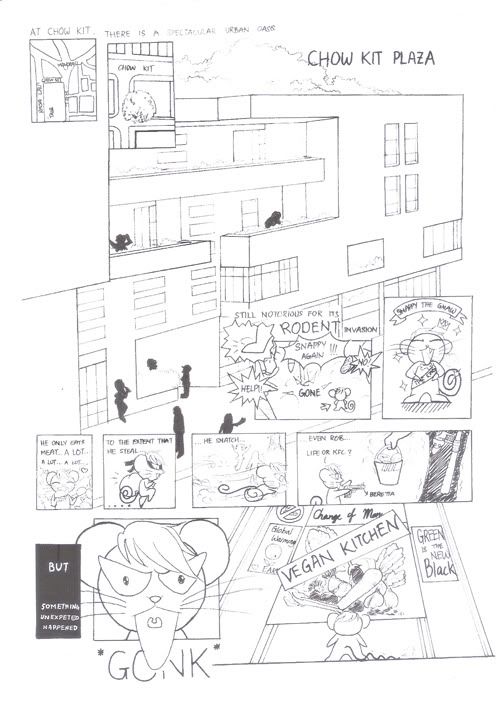
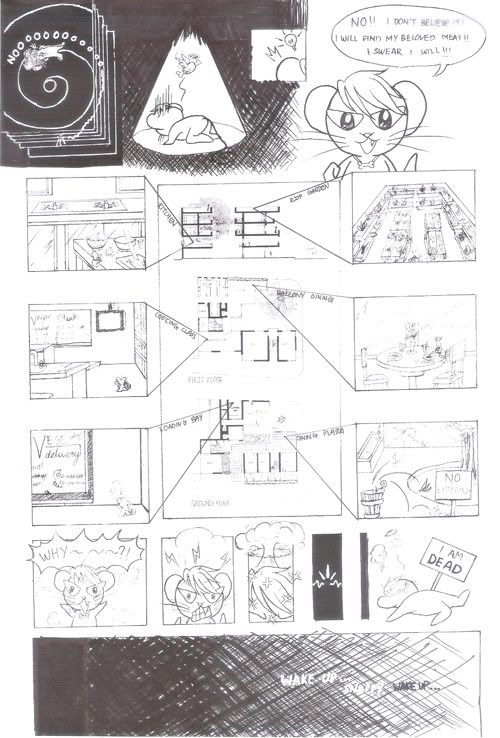
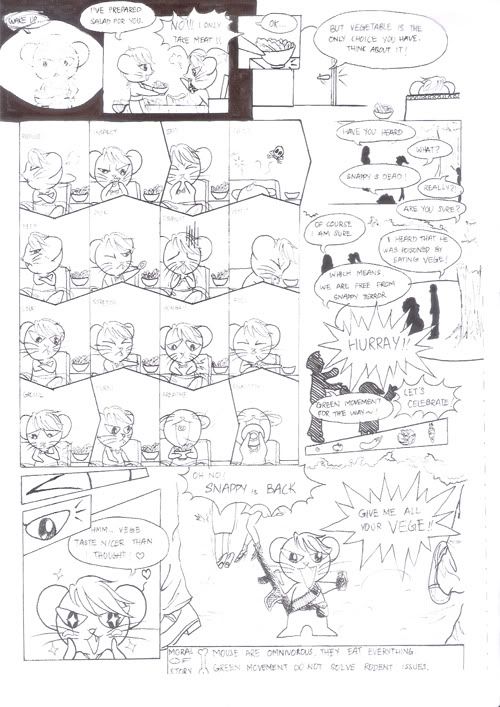
Snappy the GNAW - Comic
Coursework Condition:
1. 3 - 5 pages.
2. Setting must be in or around a certain building.
Please Enjoy.
课业的条件:
1. 三至五页。
2. 背景必须在某个建筑内、四周。
敬请观赏。
1
2
3
~ The End ~
Medium 媒介: Traditional传统
Tool工具 : Paper纸, Tracing Paper透写纸, Blue Lead Pencil蓝铅笔, Sakura Micron Pen樱色代针笔 0.05, 0.1, 0.3, 0.5
Labels:
§ ~ Comic,
† ~ Traditional,
∞ ~ Showcase
Wednesday, May 8, 2013
Snappy the GNAW - Cover
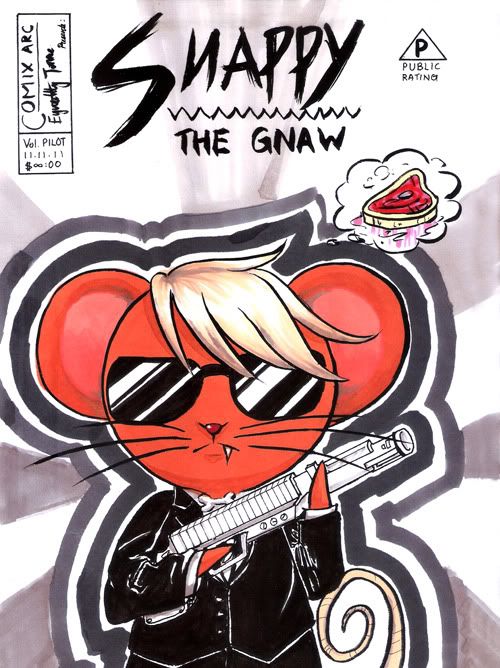
COVER 封面
It is......ugly.
The scanner pick up allll the marker pen streak!
好……难看。
扫描仪很~仔细地把麦克笔的笔触完全扫出来了!
Snappy's pose, costume and gun are inspired by Men In Black show. Isn't he cool?
小咬的姿势是从黑超特警组抄来的姿势、衣物和枪械。很威风吧?
---
Medium 媒介: Traditional传统
Tool工具 : Paper纸, Tracing Paper透写纸, Blue Lead Pencil蓝铅笔, Sakura Micron Pen樱色代针笔 0.05, 0.1, 0.3, 0.5, Shin Han Touch Markers麦克笔
Labels:
§ ~ Comic,
† ~ Traditional,
∞ ~ Showcase
Monday, May 6, 2013
Snappy the GNAW - Characters
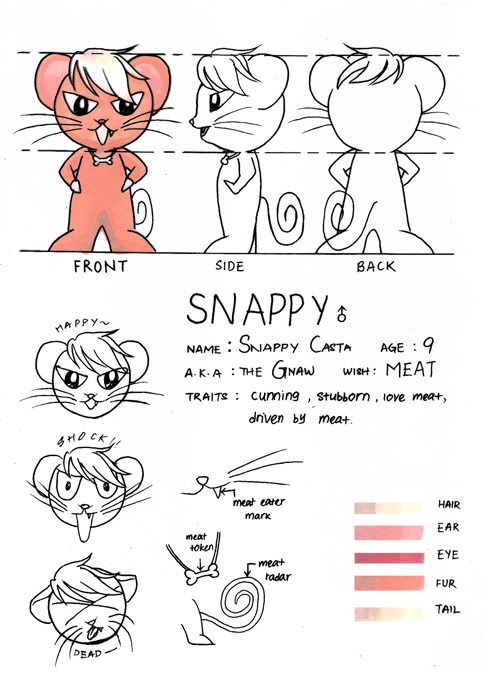
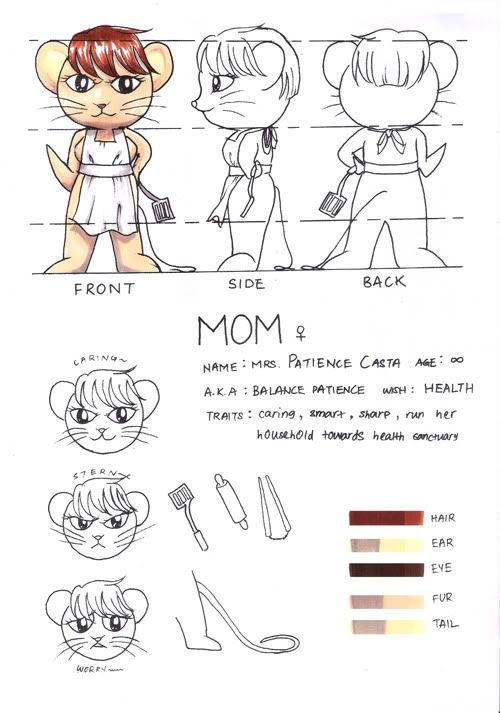
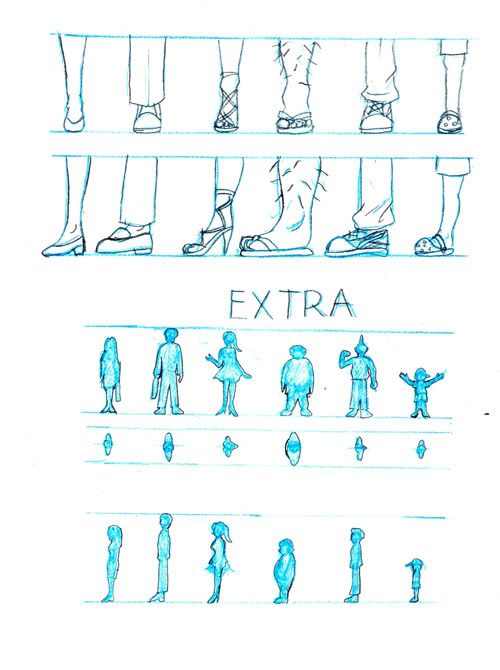
Coursework required to complete character sheet, I have one main, one supporting and a dozen of extras. Consideration for the character sheet follow the needs of story and specially tailored for main character's perspective. First there are front, side and back view, due to it being a short story therefore name and information are pretty basic, zoom in detail, colour palette and expression. Because extras are a complete different animal and not having such important role the information part is cut short, also to match the perspective of the mouse the focus was directed onto the feet.
课业规定必须做角色设计,我一共有一个主角,一个配角和一堆路人。角色设计的考量依照故事的需要和主角的视角而特别设计。首先有正,侧和后面,因为是短篇故事所以名字和资料都是很基本的,特征放大,颜色盘还有表情。路人因为是完全不同的生物而且并不大重要所以资料上并没有那么详细,而且还为了配合老鼠的角度而特别注重脚部。
Medium 媒介: Traditional传统
Tool工具 : Paper纸, Tracing Paper透写纸, Blue Lead Pencil蓝铅笔, Sakura Micron Pen樱色代针笔 0.05, 0.1, 0.3, 0.5, Shin Han Touch Markers麦克笔
Labels:
† ~ Traditional,
0 ~ Character Sheet
Sunday, May 5, 2013
Love Theorem Pythagoras - Special Effects
An art contest entry for gaiaonline.com. Derek, Jace & Amilia are characters belong to owner of the contest.
给盖亚天空的绘画比赛作品。德雷克、杰斯&阿美莉雅是属于比赛主办者。
These screenshots showed that how I arranged all different colours into different layers with utmost patience, just for the sake of convenience of correction and making special effects, after all it is easier when it were all separated from the beginning than have to separate it after the colours are merged together. The dark blue organza was amongst the first being adjusted to lower its opacity for the transparent effect, because plum flower's stamen details are small so it was drawn straight with colours without lining. Lastly the shadow and highlight was also adjusted, I used 4 tools, each can achieved similar effects, depending on which you are familiar with.
这些截图有显示我如何不嫌烦的把每个颜色都放在不同的图层,就为了方便更改和弄特效,毕竟一开始就分好的话比之后分开容易得多。首先调整的有一层半透明的深蓝色网纱,梅花的花蕊因为细小所以不必描线直接用颜色画上。最后还调整了光影的深度,我所用的工具有四种,每种都能达到类似的效果,端看你比较熟悉哪个。
To match the colour of the plum flower, shiny little beads were added on the dark blue organza, this further compliments the plum flower's existence. At the same time, I didn't forget to add a shine on Jace's white teeth. After that I felt that the two guy's tuxedo seemed to be too smooth, so I added texture on Derek's jacket who was also the one at front. Lastly, although it is not noticeable, I have added moon light shine on top left corner.
为了配合梅花的颜色,深蓝的网纱还镶上了点点闪烁的珠子,更加凸显出梅花的存在。同时也没有忘记把杰斯的白牙弄闪。之后察觉两个男的西装都太柔滑了,就把最前面的德雷克衣物加上不同布料的质感。最后,虽然不容易察觉,左上方还画上了月光光线。
Mark, Finish!
上印,完成!
---
Character 人物: Derek, Jace & Amilia 德雷克、杰斯&阿美莉雅
Medium 媒介: Digital 电脑
Tool工具 : HP Pavillion, 64-bit Vista, 4gb DDR3, nVidia Geforce GT120, WACOM Intuous 3.
Programme 软件: SAI彩, Adobe Photoshop CS3
Contrast
Image -> Adjustment -> Brightness/Contrast
Image -> Adjustment -> Levels [ctrl] + [L]
Image -> Adjustment -> Curves [ctrl] + [M]
Image -> Adjustment -> Hue/Saturation [ctrl] + [U]
Texture
Feather -> Pattern Overlay
Blend Mode : Colour burn
Opacity : 10%
给盖亚天空的绘画比赛作品。德雷克、杰斯&阿美莉雅是属于比赛主办者。
These screenshots showed that how I arranged all different colours into different layers with utmost patience, just for the sake of convenience of correction and making special effects, after all it is easier when it were all separated from the beginning than have to separate it after the colours are merged together. The dark blue organza was amongst the first being adjusted to lower its opacity for the transparent effect, because plum flower's stamen details are small so it was drawn straight with colours without lining. Lastly the shadow and highlight was also adjusted, I used 4 tools, each can achieved similar effects, depending on which you are familiar with.
这些截图有显示我如何不嫌烦的把每个颜色都放在不同的图层,就为了方便更改和弄特效,毕竟一开始就分好的话比之后分开容易得多。首先调整的有一层半透明的深蓝色网纱,梅花的花蕊因为细小所以不必描线直接用颜色画上。最后还调整了光影的深度,我所用的工具有四种,每种都能达到类似的效果,端看你比较熟悉哪个。
To match the colour of the plum flower, shiny little beads were added on the dark blue organza, this further compliments the plum flower's existence. At the same time, I didn't forget to add a shine on Jace's white teeth. After that I felt that the two guy's tuxedo seemed to be too smooth, so I added texture on Derek's jacket who was also the one at front. Lastly, although it is not noticeable, I have added moon light shine on top left corner.
为了配合梅花的颜色,深蓝的网纱还镶上了点点闪烁的珠子,更加凸显出梅花的存在。同时也没有忘记把杰斯的白牙弄闪。之后察觉两个男的西装都太柔滑了,就把最前面的德雷克衣物加上不同布料的质感。最后,虽然不容易察觉,左上方还画上了月光光线。
Mark, Finish!
上印,完成!
---
Character 人物: Derek, Jace & Amilia 德雷克、杰斯&阿美莉雅
Medium 媒介: Digital 电脑
Tool工具 : HP Pavillion, 64-bit Vista, 4gb DDR3, nVidia Geforce GT120, WACOM Intuous 3.
Programme 软件: SAI彩, Adobe Photoshop CS3
Contrast
Image -> Adjustment -> Brightness/Contrast
Image -> Adjustment -> Levels [ctrl] + [L]
Image -> Adjustment -> Curves [ctrl] + [M]
Image -> Adjustment -> Hue/Saturation [ctrl] + [U]
Texture
Feather -> Pattern Overlay
Blend Mode : Colour burn
Opacity : 10%
Saturday, May 4, 2013
Love Theorem Pythagoras - Shade
An art contest entry for gaiaonline.com. Derek, Jace & Amilia are characters belong to owner of the contest.
给盖亚天空的绘画比赛作品。德雷克、杰斯&阿美莉雅是属于比赛主办者。
This time, I tried another approach in shading the shade colour. Instead of pure black/gray low opacity, I tried using a dark purple with low opacity. For highlights, instead of pure white low opacity, I tried to use the lighting colours, which is yellow in low opacity. As for the hair, the description is having strands of red and yellow highlights not clumps of hair, so extra lines are sketched on to represent it.
这次,我在调色颜色选择方面做了另一种尝试。我用低不透明的深紫色来上阴影而不是低不透明的纯黑或灰色。至于光亮方面,我试用灯的颜色,也就是低不透明黄色来打光。至于头发,形容上是丝丝的红黄染发而不是撮,所以多画了线条来表现染发。
I quite like how purple shadow and yellow highlight work in this setting. To match the background soft style, instead of celshade, the shades are not sharp edged, but in soft brush stroke.
我非常满意深紫阴影和浅黄打光在这背景的效果。为了配合背景的柔和风格,色调边缘并不清晰,使用的是柔和的毛刷笔触而不是卡通渲染法。
---
Character 人物: Derek, Jace & Amilia 德雷克、杰斯&阿美莉雅
Medium 媒介: Digital 电脑
Tool工具 : HP Pavillion, 64-bit Vista, 4gb DDR3, nVidia Geforce GT120, WACOM Intuous 3.
Programme 软件: SAI彩
给盖亚天空的绘画比赛作品。德雷克、杰斯&阿美莉雅是属于比赛主办者。
This time, I tried another approach in shading the shade colour. Instead of pure black/gray low opacity, I tried using a dark purple with low opacity. For highlights, instead of pure white low opacity, I tried to use the lighting colours, which is yellow in low opacity. As for the hair, the description is having strands of red and yellow highlights not clumps of hair, so extra lines are sketched on to represent it.
这次,我在调色颜色选择方面做了另一种尝试。我用低不透明的深紫色来上阴影而不是低不透明的纯黑或灰色。至于光亮方面,我试用灯的颜色,也就是低不透明黄色来打光。至于头发,形容上是丝丝的红黄染发而不是撮,所以多画了线条来表现染发。
I quite like how purple shadow and yellow highlight work in this setting. To match the background soft style, instead of celshade, the shades are not sharp edged, but in soft brush stroke.
我非常满意深紫阴影和浅黄打光在这背景的效果。为了配合背景的柔和风格,色调边缘并不清晰,使用的是柔和的毛刷笔触而不是卡通渲染法。
---
Character 人物: Derek, Jace & Amilia 德雷克、杰斯&阿美莉雅
Medium 媒介: Digital 电脑
Tool工具 : HP Pavillion, 64-bit Vista, 4gb DDR3, nVidia Geforce GT120, WACOM Intuous 3.
Programme 软件: SAI彩
Friday, May 3, 2013
Love Theorem Pythagoras - Color & Background
An art contest entry for gaiaonline.com. Derek, Jace & Amilia are characters belong to owner of the contest.
给盖亚天空的绘画比赛作品。德雷克、杰斯&阿美莉雅是属于比赛主办者。
I can't forget what a joke I made by mixing up Derek and Jace's Hair style. XD All the information are correct, but somehow the hairstyle got mess up. I quickly go and adjust the mistake.
我不能忘记我闹了什么笑话,竟然将德雷克和杰斯的发型搞错了。XD所有的资料都没错,但是不知怎的就发型搞错了。我赶快跑去订正错误。
My habit of coloring have to start with having all base colour fill in according to their shapes precisely from the beginning. At that time, I haven't figure out the easier way to fill in colours for SAI, so I switch to Photoshop just to fill in the colours.
我上色的习惯是从一开始就必须根据形状先上基本色。那时候,我还没有在彩内研究出如何比较容易上色的方法,所以转去Photoshop就为了填色。
1. Select using Lasso/Magic Wand.
1. 用Lasso/Magic Wand圈选。
2. Expand the selection by 1 or 2 or any size of pixel depending on how thick your line is.
2. 根据线的粗细,扩充圈选大约1或2或任何数量的像素。
3. Fill in colour.
3. 填色。
Magic Wand is a very convenient tool to select the area as it did most of the selection for you, depending on the Magic Wand Tolerance, selection line might not reach the centre of the line. It would look ugly if the colour is not filled up to the centre of the line as it would appear that there are black and white lines around each colour shapes. That is why Step 2 is needed to expand the selection line to reach the center of the line.
Magic Wand的确是个对圈选任务非常方便的工具因为它自动帮你圈选任何形状,根据Magic Wand Tolerance的设定,圈选线可能没有达到线中间。如果就这样上色的话会变得很难看,因为每个颜色块都会被一层白一层黑的线包围着。为了将圈选线达到线中间的所以第2步的扩充圈选是必要的。
After filling in colours, it is time to shade it. Unusually, this time I decided to start with background. As mentioned before, the art setting was in a ballroom kinda old Europe ballroom feel. To match that atmosphere, I attempted a painting effect imitating the old art traditional style brush strokes. As can see on the curtain, I tried to brush it so simulate fabric. But the background is different, I used a cross tip brush and just squiggle in small circles around everywhere, kind of Van Gogh strokes inspired.
填完色之后,润色时间到了。稀奇的,这次我打算从背景开始。如之前提过,故事背景处在拥有旧欧洲风的舞厅。为了配合那样的气氛,我尝试了模仿旧画传统派的手法。就如图上显示的布帘,尽量用笔刷把布料表现出来。可是背景就不同了,我用十字笔尖形的笔刷在四周画上小圈圈,类似梵高的风格。
---
Character 人物: Derek, Jace & Amilia 德雷克、杰斯&阿美莉雅
Medium 媒介: Digital 电脑
Tool工具 : HP Pavillion, 64-bit Vista, 4gb DDR3, nVidia Geforce GT120, WACOM Intuous 3.
Programme 软件: Adobe Photoshop CS3, SAI彩
Base Colour
Lasso Tool [L]
Magic Wand [W]
Select -> Modify -> ?pixel
Edit > Fill [Shift] + [F5]
Background
Brush
Tip shape 笔尖形 : cross 十字
给盖亚天空的绘画比赛作品。德雷克、杰斯&阿美莉雅是属于比赛主办者。
I can't forget what a joke I made by mixing up Derek and Jace's Hair style. XD All the information are correct, but somehow the hairstyle got mess up. I quickly go and adjust the mistake.
我不能忘记我闹了什么笑话,竟然将德雷克和杰斯的发型搞错了。XD所有的资料都没错,但是不知怎的就发型搞错了。我赶快跑去订正错误。
My habit of coloring have to start with having all base colour fill in according to their shapes precisely from the beginning. At that time, I haven't figure out the easier way to fill in colours for SAI, so I switch to Photoshop just to fill in the colours.
我上色的习惯是从一开始就必须根据形状先上基本色。那时候,我还没有在彩内研究出如何比较容易上色的方法,所以转去Photoshop就为了填色。
1. Select using Lasso/Magic Wand.
1. 用Lasso/Magic Wand圈选。
2. Expand the selection by 1 or 2 or any size of pixel depending on how thick your line is.
2. 根据线的粗细,扩充圈选大约1或2或任何数量的像素。
3. Fill in colour.
3. 填色。
Magic Wand is a very convenient tool to select the area as it did most of the selection for you, depending on the Magic Wand Tolerance, selection line might not reach the centre of the line. It would look ugly if the colour is not filled up to the centre of the line as it would appear that there are black and white lines around each colour shapes. That is why Step 2 is needed to expand the selection line to reach the center of the line.
Magic Wand的确是个对圈选任务非常方便的工具因为它自动帮你圈选任何形状,根据Magic Wand Tolerance的设定,圈选线可能没有达到线中间。如果就这样上色的话会变得很难看,因为每个颜色块都会被一层白一层黑的线包围着。为了将圈选线达到线中间的所以第2步的扩充圈选是必要的。
After filling in colours, it is time to shade it. Unusually, this time I decided to start with background. As mentioned before, the art setting was in a ballroom kinda old Europe ballroom feel. To match that atmosphere, I attempted a painting effect imitating the old art traditional style brush strokes. As can see on the curtain, I tried to brush it so simulate fabric. But the background is different, I used a cross tip brush and just squiggle in small circles around everywhere, kind of Van Gogh strokes inspired.
填完色之后,润色时间到了。稀奇的,这次我打算从背景开始。如之前提过,故事背景处在拥有旧欧洲风的舞厅。为了配合那样的气氛,我尝试了模仿旧画传统派的手法。就如图上显示的布帘,尽量用笔刷把布料表现出来。可是背景就不同了,我用十字笔尖形的笔刷在四周画上小圈圈,类似梵高的风格。
---
Character 人物: Derek, Jace & Amilia 德雷克、杰斯&阿美莉雅
Medium 媒介: Digital 电脑
Tool工具 : HP Pavillion, 64-bit Vista, 4gb DDR3, nVidia Geforce GT120, WACOM Intuous 3.
Programme 软件: Adobe Photoshop CS3, SAI彩
Base Colour
Lasso Tool [L]
Magic Wand [W]
Select -> Modify -> ?pixel
Edit > Fill [Shift] + [F5]
Background
Brush
Tip shape 笔尖形 : cross 十字
Labels:
† ~ Digital,
4 ~ Color,
5 ~ Background
Thursday, May 2, 2013
Love Theorem Pythagoras - Line
An art contest entry for gaiaonline.com. Derek, Jace & Amilia are characters belong to owner of the contest.
给盖亚天空的绘画比赛作品。德雷克、杰斯&阿美莉雅是属于比赛主办者。
Look at the date watermark over the WIP... I have screen capture the WIP when I was doing it and the particular case that I am not motivated enough to put it up on the blog. Like... little bit more than 2 years ago, so not surprisingly, I forget most of the details.
瞧瞧截图水印上的日期…绘画的时候截的图,由于动力不足而没有放上网志的其中之一。好像…超过两年了,就算忘了过程的点滴也不奇怪。
I have the habit of organizing layers, so I started off creating folders for each characters. For lining, I use the Vector Layer, because vector uses path which can be edit later easily, so I do not need to keep erase and redraw the curve I want to achieve. I find it easier to work with points, besides, it is also easier to select even they mesh in the same layer. Conclusion is, the vector layer allows adjustment and flexibility.
我有把图层排列好的习惯,所以一开始就为每个角色列出文件夹。构线的话,我用的是矢量图层,因为矢量图层使用可以在之后容易调整的线稿,那样的话我就不必一直擦掉和重新描出我想要的曲线。我觉得矢量点很容易掌握,而且就算在同一个图层也比较容易圈选。总之,矢量图层允许调整性和通融性。
SAI Vector Layer have more advantages than Photoshop. You can freely adjust the pressure of each point and easily drop the weight on each line. I divide layers according to line thickness, generally I use 0.3 and 0.5 thickness. It also have different edge shape to select depending on how sharp you want your line look.
彩的矢量图层比Photoshop备有更多好处。你可以随意调整每个矢量点的笔压和更改线条的粗细。我根据线条的粗细来分开图层,通常使用0.3和0.5。它也有不同的线边缘形可以选择,但看你需要多清晰的线条。
After tracing the lines of each character, fixing a few mistakes on the way as you can see the final black line do not follow closely to the blue sketch at some places in the above pictures. Then I adjust the height the pair of boy and girl at the back. As the boy seem to be taller according to the character biography.
将每个角色描完线之后,过程中也顺便修改了一些差错,如以上所有的截图显示,并不是每条黑线都紧跟蓝线。然后我调整了后方两个男女的高度。根据人物介绍那男的似乎比较高。
Line Stage, Finish!
描线阶段,完成!
---
Character 人物: Derek, Jace & Amilia 德雷克、杰斯&阿美莉雅
Medium 媒介: Digital 电脑
Tool工具 : HP Pavillion, 64-bit Vista, 4gb DDR3, nVidia Geforce GT120, WACOM Intuous 3.
Programme 软件: SAI彩
Vector Layer矢量图层
Pen 笔
Pen Edge 线边缘形 : 3
Pen Thickness 笔的粗细 : 0.3 & 0.5
Colour 颜色 : # 000 000
给盖亚天空的绘画比赛作品。德雷克、杰斯&阿美莉雅是属于比赛主办者。
Look at the date watermark over the WIP... I have screen capture the WIP when I was doing it and the particular case that I am not motivated enough to put it up on the blog. Like... little bit more than 2 years ago, so not surprisingly, I forget most of the details.
瞧瞧截图水印上的日期…绘画的时候截的图,由于动力不足而没有放上网志的其中之一。好像…超过两年了,就算忘了过程的点滴也不奇怪。
I have the habit of organizing layers, so I started off creating folders for each characters. For lining, I use the Vector Layer, because vector uses path which can be edit later easily, so I do not need to keep erase and redraw the curve I want to achieve. I find it easier to work with points, besides, it is also easier to select even they mesh in the same layer. Conclusion is, the vector layer allows adjustment and flexibility.
我有把图层排列好的习惯,所以一开始就为每个角色列出文件夹。构线的话,我用的是矢量图层,因为矢量图层使用可以在之后容易调整的线稿,那样的话我就不必一直擦掉和重新描出我想要的曲线。我觉得矢量点很容易掌握,而且就算在同一个图层也比较容易圈选。总之,矢量图层允许调整性和通融性。
SAI Vector Layer have more advantages than Photoshop. You can freely adjust the pressure of each point and easily drop the weight on each line. I divide layers according to line thickness, generally I use 0.3 and 0.5 thickness. It also have different edge shape to select depending on how sharp you want your line look.
彩的矢量图层比Photoshop备有更多好处。你可以随意调整每个矢量点的笔压和更改线条的粗细。我根据线条的粗细来分开图层,通常使用0.3和0.5。它也有不同的线边缘形可以选择,但看你需要多清晰的线条。
After tracing the lines of each character, fixing a few mistakes on the way as you can see the final black line do not follow closely to the blue sketch at some places in the above pictures. Then I adjust the height the pair of boy and girl at the back. As the boy seem to be taller according to the character biography.
将每个角色描完线之后,过程中也顺便修改了一些差错,如以上所有的截图显示,并不是每条黑线都紧跟蓝线。然后我调整了后方两个男女的高度。根据人物介绍那男的似乎比较高。
Line Stage, Finish!
描线阶段,完成!
---
Character 人物: Derek, Jace & Amilia 德雷克、杰斯&阿美莉雅
Medium 媒介: Digital 电脑
Tool工具 : HP Pavillion, 64-bit Vista, 4gb DDR3, nVidia Geforce GT120, WACOM Intuous 3.
Programme 软件: SAI彩
Vector Layer矢量图层
Pen 笔
Pen Edge 线边缘形 : 3
Pen Thickness 笔的粗细 : 0.3 & 0.5
Colour 颜色 : # 000 000
Wednesday, May 1, 2013
M.B.A Menewsha Bishie Alliance - Showcase
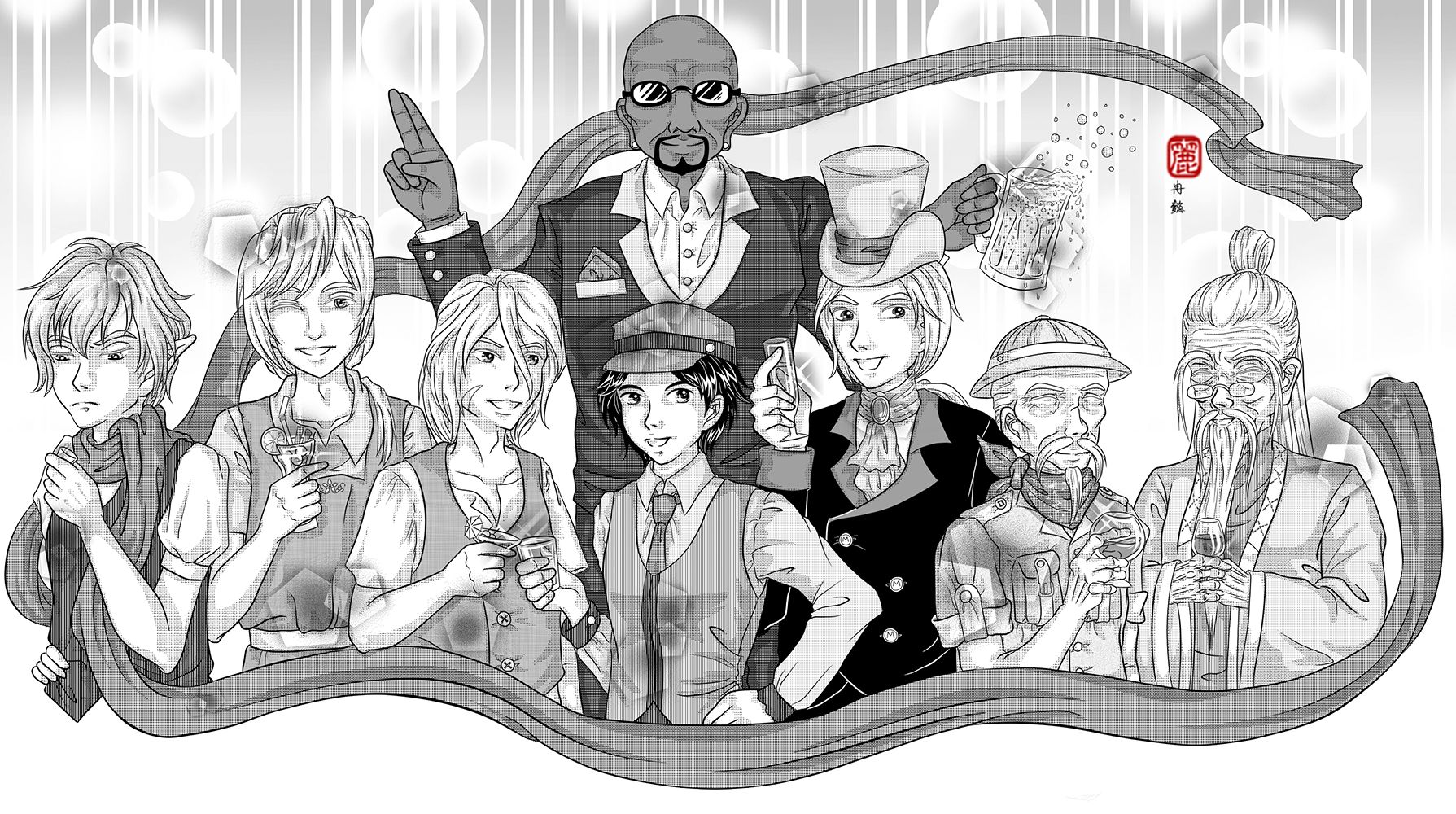
A commission for menewsha.com. Menewsha Bishie Alliance (M.B.A) are official Non Playable Characters (NPC) in menewsha.com. Cain/Abel, Nalin, Nami, Magnus, Lance, Mr. Mayor, Jeryk and Toymaker.
给menewsha.com的委托绘画作品。Menewsha美男子联盟是menewsha.com官方人物。凯因或亚貝尔、纳林、纳米、麦葛那斯、岚斯、市长先生、杰力克、玩具家。
Had not been very productive in the last few years after making the blog, been busy with university and what not. Which a few projects are abandoned due to not enough time or motivation at that time. Even though when I am productive, have completely forgotten about the blog. XD
自从制造了网志,为了大学类似的事情变得非常忙碌导致近几年来没有作出任何作品。同时也因为时间与动力不足而放弃了一些计划。就算偶尔完成了作品也把网志给忘掉了。XD
It had been a long while since I update this blog, so I decided to start off with a smashing group art. Unfortunately, this time I don't have the progression pictures as I work in different medias for this group art. I will still try to cover all phase shortest as possible.
离上次更新已经很久了,所以决定用闪耀的团体图来开场。可惜的是,因为这次绘画传统电脑并用所以没有收录过程截图。我还是会尽量以最短的文字来解释每个阶段。
1. Preliminary Phase - Planning
Actually the same steps taken for planning in the post July 27th, 2010 - Heirs to the Legend - Preliminary Planning, 2010. Refer to that post, unfortunately, one of the project that I abandoned.
1. 预备阶段 - 计划
其实利用了曾经写过的27日7月2010年 - 传说的继承人 - 预备计划类似的方法。参考那篇,不幸的,是被放弃的绘画之一。
2. Executing Phase - Sketch
It started off simple circles, and decide their poses that match their personalities. This time I do it with paper and pencil.
2. 执行阶段 - 草图
用简单的圆形开始,决定每人的姿势务必配合人物的性格。这次我是用铅笔画在纸上。
3. Executing Phase - Line
I originally ink it by pen, but when I scanned in, I felt that the lines are really bad. As a perfectionist, I retrace all the line digitally in SAI. Whilst fix a few mistakes on the way.
3. 执行阶段 - 构线
我原本打算只是用构图笔的,可是扫描进去之后,觉得线很难看。身为完美主义者,我重新在电脑用SAI描线。同时也趁机修改了一些错误。
3. 执行阶段 - 构线
我原本打算只是用构图笔的,可是扫描进去之后,觉得线很难看。身为完美主义者,我重新在电脑用SAI描线。同时也趁机修改了一些错误。
4. Executing Phase - Tone
Took me some time to find the appropriate tones for each section. I use Manga Studio to fill in the tones. They have a library of special tones that I find useful. Then I export it over to Photoshop to shade. Not much tips other than balancing the screentone type and beware of the clash of too MANY patterns.
4. 执行阶段 - 网点
我用了很久的时间来为每个部分寻找适合的网点。我用Manga Studio来贴网点。它拥有一拖拉库我认为很实用的特别网点。之后传进Photoshop来上光影。并没有什么特别的捷径除了平衡网点类别和注意别利用太多不同的花纹。
---
Character 人物: MBA 美男盟
Medium 媒介: Pencil铅笔, Sakura Micron Pen 樱色代针笔0.1,0.3,0.5, Digital 电脑
Tool工具 : HP Pavillion, 64-bit Vista, 4gb DDR3, nVidia Geforce GT120, WACOM Intuous 3.
Programme 软件: SAI彩, Manga Studio EX4, Adobe Photoshop CS6
Tool工具 : HP Pavillion, 64-bit Vista, 4gb DDR3, nVidia Geforce GT120, WACOM Intuous 3.
Programme 软件: SAI彩, Manga Studio EX4, Adobe Photoshop CS6
Labels:
§ ~ Art,
† ~ Digital,
∞ ~ Showcase
Subscribe to:
Comments (Atom)